How to Set Your ListServ Subscription to Digest Mode
Last updated: March 27, 2023
What is Digest Mode?
Listserv offers many options for managing the behavior of subscribed lists. One of the most popular settings is Digest Mode. When activated for your subscription, Listserv collects all messages sent to that list and delivers them to you in a single message containing a table of contents followed by the full text of each message. On the day you activate Digest Mode, you will receive a partial digest that contains only those messages sent after the point at which you activated this feature. Each day thereafter, you will receive a full digest of all the messages sent during the 24-hour period since the last digest was received.
All of Hamilton’s mass mailing lists (e.g. events-all, notices-faculty, etc.) allow you to choose Digest Mode. The digest message for these lists is sent each day at 4:30 p.m. Private lists (i.e., those for student organizations or departments) are sent at 12:00 a.m. by default.
Getting Started
The easiest way to manage your Listserv subscription is via the Listserv web interface. This site will allow you to manage your own subscription(s) as well as manage any lists you may own. Before you can use it, you must have a Listserv password. If you already have this password, you can proceed to the steps below.
Set Your Subscription to Digest Mode
- On your web browser, go to http://listserv.hamilton.edu.
- Log in using your full e-mail address (e.g. username@hamilton.edu) and the Listserv password you created for yourself.
- On the Listserv website, click on Subscribers Options in the menu on the left. The lists to which you are subscribed should appear.
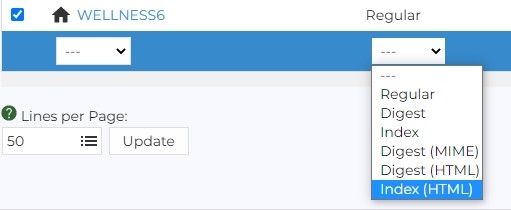
- Locate the list you wish to set to Digest Mode and check the box to enable Digest Mode.
- At the bottom of the list of subscribed listserv list are pull down options. Identify the second pull down option from the left.

- Click the down triangle and select Digest (HTML format), Digest, depending on your Digest preference.
- In the bottom right corner of
 the page, click the Update button to apply the Digest selections.
 - When you are finished, click Log Out (located in the upper right corner of the screen beneath the green question mark).
Removing Digest Mode
- Repeat steps 1-5 described above for setting Digest Mode.
- For step 6, select Regular.
- In the bottom right corner of the page, click the Update button to apply Regular mode.
- When you are finished, click Log Out (located in the upper right corner of the screen beneath the green question mark).
Comments
Contact
Team Name
Help Desk
198 College Hill Road
Clinton, NY 13323
Fri 8 a.m. - 8 p.m.
Sat - Sun 10 a.m. - 10 p.m.

No comments yet.
Comment Guidelines
Please log in to post a comment