The Hamilton Quad
Hamilton’s alumni directory and engagement platform — find classmates, discover events, and stay involved, wherever life has taken you.

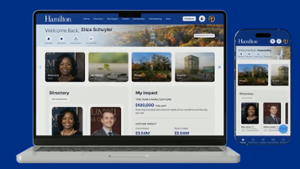
More About The HQ
“The HQ is the entire Hamilton community in your pocket — and who wouldn’t want that? It’s intuitively designed to help you stay engaged with Hamilton and its alumni wherever you are. I like that the alumni directory, events, and volunteer opportunities are now just a swipe away, and the built-in AI assistant (aptly named Milton) makes it even easier to use. Stepping into the new Hamilton Quad will be a huge leap forward in networking and building community.”
Paul Reichert ’90
President, Alumni Association
The HQ is Hamilton’s alumni directory and engagement portal. It’s the one place to find classmates, catch up on Hamilton news, see what’s happening on and off the Hill, and stay involved — available on the web and as a mobile app.
The HQ was shaped in close partnership with Hamilton alumni volunteers and the Alumni Council, and it’s designed to keep growing: like the College itself, new features will continue to roll out based on community feedback.
What You Can Do on the HQ
- Search the alumni directory & grow your network. Find classmates and friends by name, location, career industry, class year, and more, and reach out directly to alumni, faculty, and staff — you’re always in control of what others can see about you.
- Discover events. Browse and register for upcoming events near you or back on campus.
- Volunteer. Find opportunities to give your time and expertise to Hamilton and fellow alumni.
- Track your philanthropy. View your giving history to Hamilton in one place.
- Get career support. Post or browse jobs and internships, offer or request mentorship, and connect with current students exploring career paths.
- Catch up on Hamilton news. See the latest from campus and your classmates without leaving the platform.
 Available Wherever You Are
Log in from your browser at hamilton.edu/hq, or download the HQ app from the Apple App Store or Google Play. Both use the same account, so you can move between web and mobile seamlessly.

Getting Started
- Go to hamilton.edu/hq or download the HQ app.
- Sign in with your My Hamilton credentials (or LinkedIn, where available).
- Complete your profile — you can import details from LinkedIn to save time.
- Set your privacy preferences. Click your profile image, select “Profile & Privacy,” and choose what you’d like others to see. By default, your basic contact information is visible to fellow alumni unless you turn this off.
- Start exploring: search the directory, browse events, and see where you can get involved.
A Note on Privacy
You’re always in control of your visibility on the HQ. If you’d rather not appear when someone searches for you, go to your profile image Profile & Privacy and toggle “Show me in the directory” to your preference. From there, you can also fine-tune exactly what information is shared.
FAQs
How can I obtain access to the HQ?
Alumni can log in using Hamilton Single Sign-On credentials or a one-time code — no activation required. If you didn’t graduate from the College and would like to request an account (Friends of the College), contact infoserv@hamilton.edu with your name, email, and connection to Hamilton.
I can’t log in to the HQ. What should I do?
- Alumni: Review these instructions to reset your password, recover your username, or register for the first time.
- Friends of the College: Email infoserv@hamilton.edu with your name, email, and connection to Hamilton for help with access.
- Students: If you’re enrolled in Hamilton Password Manager, visit Password Reset. You can also email or call the HelpDesk at 315-859-4181.
Contact
Office / Department Name
Alumni & Parent Relations
Contact Name
Jacke Jones
Director, Alumni & Parent Relations
